
The Anatomy of a Claude Code Project: Structure Over Prompting
Most people treat CLAUDE.md like a prompt file.
They dump context into it. Instructions. Rules. Reminders. It grows. The model starts forgetting the top by the time it reaches the bottom. They write longer prompts. The model forgets more. The cycle continues.
That's the wrong mental model entirely.
Prompting is temporary. Structure is permanent.
The insight, from @BharukaShraddha: Claude Code doesn't need a better prompt. It needs a better-organized repo. When your project is structured correctly, Claude stops behaving like a chatbot you have to constantly remind — and starts acting like a project-native engineer who already knows the codebase.
Here's what that structure looks like.
| 1 | <div style="display:flex;flex-direction:column;gap:12px;"> |
| 2 | <div style="background:#fef3c7;border-radius:8px;padding:14px;"> |
| 3 | <div style="color:#92400e;font-weight:700;margin-bottom:6px;">⚙ Key Components</div> |
| 4 | <ul style="color:#2d3748;margin:0;padding-left:18px;"> |
| 5 | <li><span style="color:#166534;font-weight:600;">CLAUDE.md</span> — project memory & instructions</li> |
| 6 | <li><span style="color:#166534;font-weight:600;">.claude/skills</span> — reusable AI workflows</li> |
| 7 | <li><span style="color:#166534;font-weight:600;">.claude/hooks</span> — guardrails & automation</li> |
| 8 | <li><span style="color:#166534;font-weight:600;">docs/</span> — architecture & decisions</li> |
| 9 | <li><span style="color:#166534;font-weight:600;">src/</span> — modules with local CLAUDE.md</li> |
| 10 | </ul> |
| 11 | </div> |
| 12 | |
| 13 | <div style="background:#f0fdf4;border-radius:8px;padding:14px;"> |
| 14 | <div style="color:#14532d;font-weight:700;margin-bottom:6px;">✓ Best Practices</div> |
| 15 | <ul style="color:#2d3748;margin:0;padding-left:18px;"> |
| 16 | <li>Keep CLAUDE.md focused and short</li> |
| 17 | <li>Use skills for repeated workflows</li> |
| 18 | <li>Use hooks for non-negotiable checks</li> |
| 19 | <li>Document architecture decisions in ADRs</li> |
| 20 | <li>Keep AI context minimal and precise</li> |
| 21 | </ul> |
| 22 | </div> |
| 23 | |
| 24 | <div style="background:#fdf2f8;border-radius:8px;padding:14px;"> |
| 25 | <div style="color:#701a75;font-weight:700;margin-bottom:6px;">🚀 Getting Started</div> |
| 26 | <ul style="color:#2d3748;margin:0;padding-left:18px;"> |
| 27 | <li>Clone the repository</li> |
| 28 | <li>Configure Claude settings</li> |
| 29 | <li>Define project context in CLAUDE.md</li> |
| 30 | <li>Add reusable skills</li> |
| 31 | <li>Start building modules</li> |
| 32 | </ul> |
| 33 | </div> |
| 34 | </div> |
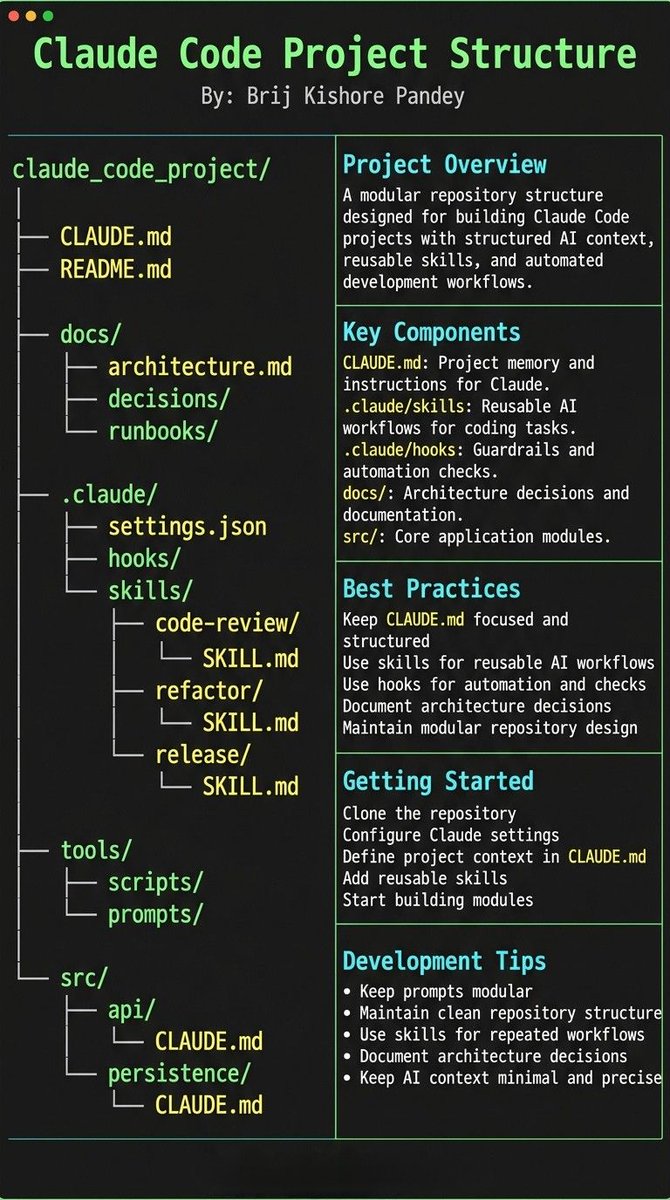
What Claude Needs
What Claude Needs at All Times
Before getting into implementation, understand the four things any collaborator — human or AI — needs to work effectively in a codebase:
| Need | Questions It Answers |
|---|---|
| The Why | What does this system do? What problem does it solve? What are we optimizing for? |
| The Map | Where does everything live? What is the file structure? Which modules own which concerns? |
| The Rules | What's allowed? What's forbidden? What patterns do we use here? What do we never do? |
| The Flows | How does work get done? What does "done" look like? How do we test, review, deploy? |
A senior engineer internalizes all four. Claude Code needs them made explicit — but once they are, the behavior changes completely.
The anatomy of a Claude Code project is simply an answer to each of these four questions, expressed in the right file in the right place.
The Five Pillars
1. CLAUDE.md — Repo Memory (Keep It Short)
CLAUDE.md is the north star. Not a knowledge dump. If it's more than a page, it's already too long.
A good CLAUDE.md has three sections and nothing else:
| Section | Contents |
|---|---|
| Purpose (Why) | One paragraph. What this repo does. What it's optimizing for. What kind of codebase this is. |
| Repo Map (What) | File tree with one-line annotations. src/auth/ → authentication, JWT, session; src/billing/ → Stripe integration, invoices; src/api/ → REST endpoints, rate limiting; docs/ → architecture, ADRs, runbooks |
| Rules + Commands (How) | How to run tests: pnpm test; How to build: pnpm build; Key constraints: Never modify migration files; All API changes need an ADR; Auth module: read CLAUDE.md in src/auth/ |
If it gets longer than this, move the detail into docs/ and link to it. The model reads CLAUDE.md on every session. Every line competes for context window.
The goal of CLAUDE.md is orientation, not education. It should answer "where am I and what are the rules?" in under two minutes of reading.
2. .claude/skills/ — Reusable Expert Modes
This is the highest-leverage thing most teams aren't doing.
A skill is a file that defines a complete workflow — a mode Claude enters when you invoke it. Instead of re-explaining your code review process every session, you write it once as a skill and invoke it with a slash command.
| Skill | Purpose |
|---|---|
/review |
Code review checklist for this codebase. What to look for. What to flag. How to comment. Security concerns specific to your domain. |
/refactor |
The refactoring playbook. Naming conventions. Pattern preferences. What abstractions you use. What you avoid. |
/release |
Release procedure, step by step. What to check. What to update. Who to notify. How to rollback. |
/debug |
Debugging flow for this system. Where logs live. How to read traces. Common failure patterns and their causes. |
Skills produce consistency across sessions. Skills produce consistency across teammates. One file. Written once. Reused forever.
The difference between a team where every Claude session starts from scratch and a team where every session starts from expertise is almost entirely whether they've built a skills library.
3. .claude/hooks/ — Guardrails That Don't Forget
Models forget. Context windows end. New sessions start clean.
Hooks don't forget.
A hook is a shell command that fires automatically on specific Claude Code events — before a tool call, after an edit, after a bash command. They're not suggestions. They're deterministic enforcement.
| Hook Type | Uses |
|---|---|
| After Edit Hooks | Run formatter (prettier, gofmt, rustfmt); Run linter on changed files; Validate imports haven't broken |
| After Bash Hooks | Run affected tests after core changes; Check that env variables are set; Validate output against schema |
| Pre-Tool Hooks (blocking) | Block edits to auth/ without confirmation; Block edits to migration files entirely; Block rm -rf or destructive commands; Require test run before any commit |
The rule of thumb: Anything that "must always happen" is a hook. Anything that "should probably happen" is a skill. Anything Claude "should know" is in docs/.
Hooks are particularly valuable for the sharp edges of a codebase — the parts where a wrong edit has outsized consequences. You don't want to rely on Claude remembering the warning in CLAUDE.md when it's editing the billing module at step 15 of a 20-step task.
4. docs/ — Progressive Context
The mistake is bloating CLAUDE.md with everything Claude might ever need.
The right pattern: CLAUDE.md tells Claude where truth lives. Claude reads the relevant doc when it needs to go deeper.
| File/Directory | Purpose |
|---|---|
docs/architecture.md |
How the system is designed. Data flow. Key decisions. What's intentional vs. legacy. |
docs/adr/001-auth.md |
Why we chose this auth approach. |
docs/adr/002-db.md |
Why this database schema. |
docs/adr/003-api.md |
Why REST over GraphQL here. |
docs/runbooks/deploy.md |
How to deploy safely. |
docs/runbooks/rollback.md |
How to roll back. |
docs/runbooks/incidents.md |
How to handle production fires. |
Claude reads what it needs, when it needs it. CLAUDE.md stays lean. Docs stay authoritative and specific.
ADRs are particularly powerful here. When Claude is about to make an architectural decision, knowing that ADR-003 already documents why you chose REST over GraphQL prevents it from "helpfully" suggesting a GraphQL refactor.
5. Local CLAUDE.md Files — Context at the Sharp Edges
This is the finishing move.
Put a small CLAUDE.md file directly inside your most dangerous modules:
| 1 | src/auth/CLAUDE.md |
| 2 | src/billing/CLAUDE.md |
| 3 | src/persistence/CLAUDE.md |
| 4 | infra/CLAUDE.md |
Claude reads the local CLAUDE.md when it navigates into that directory. This means the gotchas, constraints, and critical warnings appear exactly when Claude is about to work in that area — not at session start when they've already been forgotten.
A local CLAUDE.md for src/auth/ might contain:
| Rule | Detail |
|---|---|
| Module purpose | This module handles all authentication. |
| Never | Store tokens in localStorage (XSS risk); Log request bodies (contains credentials); Bypass the rate limiter for "testing"; Modify session.ts without reading ADR-001 |
| Secrets | The JWT signing key is in env.SECRET_KEY. Never hardcode. Never log. Never expose. |
| When adding auth flows | Update auth-flows.md in docs/ before writing any code. |
Two minutes to write. Prevents the class of mistake that takes two days to debug and requires a security disclosure.
The Bigger Picture
The Mental Model Shift
The reason most developers don't get great results from Claude Code isn't that the model is bad. It's that they're treating a collaboration problem like a prompting problem.
A new senior engineer joining your team doesn't need a better onboarding prompt. They need documentation, a codebase that explains itself, and guardrails that prevent expensive mistakes during the first weeks.
Claude Code is the same. Give it the same things you'd give a new senior hire:
| Prompting Approach | Structural Approach |
|---|---|
| Write long instructions every session. | Write the structure once. |
| Repeat context that was forgotten. | Every session starts with full context. |
| Correct mistakes caused by missing context. | Hooks catch the mistakes before they land. |
| Start over when the context window fills. | Skills encode expertise that doesn't degrade. |
Prompting is effort repeated every session. Structure is effort invested once.
The repositories where Claude Code feels magical are not the ones with better prompts. They're the ones where someone spent an afternoon setting up the anatomy correctly — and then stopped thinking about it, because Claude started behaving like it was already there.
Related: The Evolution of Agentic Programming — how AI coding assistants went from autocomplete to autonomous engineering partners.